Concept#
Small engraved rune plaques for cladding Thousand Sons / Prospero-themed terrain (pyramids, obelisks, ruins) — or just as standalone scatter detail. Sixteen unique glyphs plus a blank frame panel, in six border styles, all sized and oriented for flat, support-free resin printing.
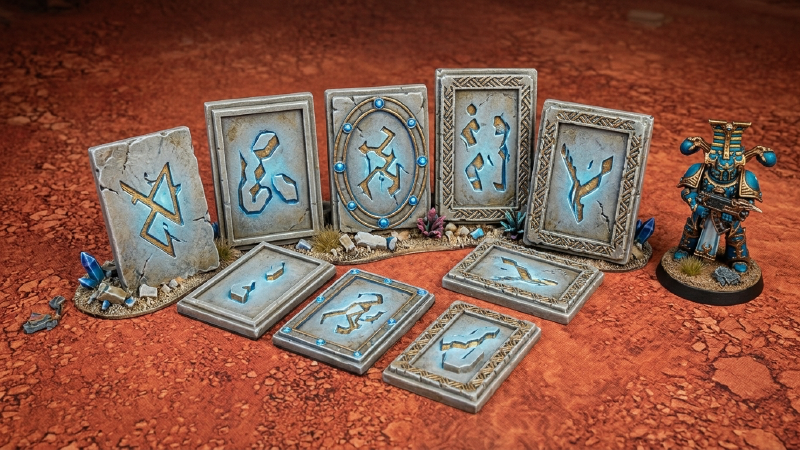
What you get#
- 16 unique rune glyphs (
manifestation,decay,binding,chaos,cycle,void,dominion,earth,entropy,fire,flow,will,life,growth,transcendence,sacred), each embossed on its own panel, plus 1 blank panel (frame only, no rune) — 17 STLs per border style. - 6 border styles — same glyph, same panel, different frame:
| Style | Look |
|---|---|
v1_plain | no frame — bare glyph |
v2_ring_gems | thin rule-line ring, studded with diamond gems |
v3_fishbone_spine | rule-line spine with periodic crossed ribs |
v4_fishbone_rows | dense woven fishbone texture, no frame line |
v5_fishbone_2strand | rail + zigzag ribbon (2-strand) |
v6_fishbone_3strand | rail + zigzag ribbon (3-strand, denser) |
Pick whichever frame matches the rest of the board — or mix and match.
Panel spec#
- 18 × 27 × 2mm base panel, glyph emboss standing ~1.5mm proud of the face (frame details are lower relief, ~0.6–0.8mm).
- All 12 edges are chamfered — softens the print, and gives a scraper something to catch when popping panels off the build plate.
- Each panel is oriented flat, glyph face up, plain back down — no supports needed, prints straight to the build plate.
Printing#
Designed and tested on an Anycubic Photon Mono 2 (143 × 89mm plate). At 18×27mm per panel, expect roughly a dozen panels per plate with comfortable spacing — tighter auto-arrangement in a slicer can likely do better. No supports required; orient with the flat back against the plate as exported.
Generator scripts#
Each rune_panel_v*.py is a self-contained Blender script (tested on Blender 5.x) that generates the full 17-panel set for its border style — open in Blender’s Scripting workspace and run (Alt+P), or headless via blender --background --python rune_panel_vN_*.py:
rune_panel_v1_plain.pyrune_panel_v2_ring_gems.pyrune_panel_v3_fishbone_spine.pyrune_panel_v4_fishbone_rows.pyrune_panel_v5_fishbone_2strand.pyrune_panel_v6_fishbone_3strand.pybuild_stamp_library.py— builds the reusable glyph stamp library the panel scripts draw from
check_panel_volumes.py is a sanity check to run after regenerating a batch — flags any panel whose volume looks off from the rest (a sign a boolean operation silently dropped or duplicated geometry, rather than a real error, so worth checking before printing):
python3 check_panel_volumes.py output/v6_fishbone_3strand